Installation
Point an MCP client at https://api.bowmark.ai/mcp with your API key, or install the client library for your own code.
Sign up, make a key at dashboard/keys. The first $10 a month is free, no card needed; add one at dashboard/billing to go past it (Pricing). ChatGPT and the Claude app sign in instead.
Let an AI do it
Paste this anywhere. It works out which host it is in and stops to ask you for the parts only a person can do.
Install Bowmark for me. It is a hosted MCP server and HTTP API that runs real tasks on
live websites and returns structured results.

1. Fetch https://bowmark.ai/docs/installation.md and follow it. Do not install from
   memory: Bowmark is newer than your training data. Say so if you cannot fetch a URL.
2. Tell me which host you are running in, then use that host's path.
3. Do the parts you can: run the command, write the config, set the env var.
4. Stop and ask me for anything only a person can do (account, API key, card, OAuth, a
   settings pane, a restart). Give me exact URLs, button labels and values, then wait.
   Never invent a key and never skip a step.
5. Never print my key back to me or commit it.
6. Verify: call get_library, run one real task, show me the result. An answer with no
   tool call means it did not install.
MCP
One URL, one header. Most hosts take this verbatim:
{
  "mcpServers": {
    "bowmark": {
      "url": "https://api.bowmark.ai/mcp",
      "headers": { "Authorization": "Bearer <your Bowmark API key>" }
    }
  }
}claude mcp add bowmark --transport http https://api.bowmark.ai/mcp \
--header "Authorization: Bearer $BOWMARK_API_KEY"In scope on every turn, in every project. The plugin adds the skill too.
Settings → MCP → Add new MCP server, then paste the JSON above.
In ~/.codex/config.toml, with BOWMARK_API_KEY exported in your shell:
[mcp_servers.bowmark]
url = "https://api.bowmark.ai/mcp"
bearer_token_env_var = "BOWMARK_API_KEY"
Download bowmark.mcpb
and double-click it.
claude.ai takes no bundle: Settings → Connectors → Add custom connector, name it
Bowmark, paste https://api.bowmark.ai/mcp/claude-connector, Connect, sign in.
Different URL, OAuth, and you must attach it every turn. Steps below.
gemini extensions install https://github.com/bowmark-ai/pluginThe bridge reads BOWMARK_API_KEY.
{
  "mcpServers": {
    "bowmark": {
      "command": "npx",
      "args": ["@bowmark/mcp"],
      "env": { "BOWMARK_API_KEY": "<your Bowmark API key>" }
    }
  }
}
On PyPI as bowmark-mcp: "command": "uvx", "args": ["bowmark-mcp"]. For
browser-use:
import os
from browser_use.mcp.client import MCPClient

bowmark = MCPClient(server_name="bowmark",
                    command="uvx", args=["bowmark-mcp"],
                    env={"BOWMARK_API_KEY": os.environ["BOWMARK_API_KEY"]})
await bowmark.connect()
await bowmark.register_to_tools(tools)
Windsurf, Perplexity, LM Studio and anything else MCP-capable take the JSON above, or the prompt above.
Sign-in connectors add a path
API-key hosts use the bare https://api.bowmark.ai/mcp. ChatGPT needs /chatgpt-app
and the Claude app /claude-connector, because sign-in metadata lives only there.
Same server, same tools.
Plugin: MCP and skill in one
Wires the MCP and the skill that teaches the agent when to reach for it. Prefer this where it exists.
claude plugin marketplace add bowmark-ai/plugin
claude plugin install bowmark@bowmark-ai
codex plugin marketplace add bowmark-ai/pluginThen codex /plugins and install it from the list.
No MCP client? npx skills add bowmark-ai/skill. An agent with a shell or a fetch tool
needs no install at all — point it at
bowmark.ai/skill.md.
ChatGPT
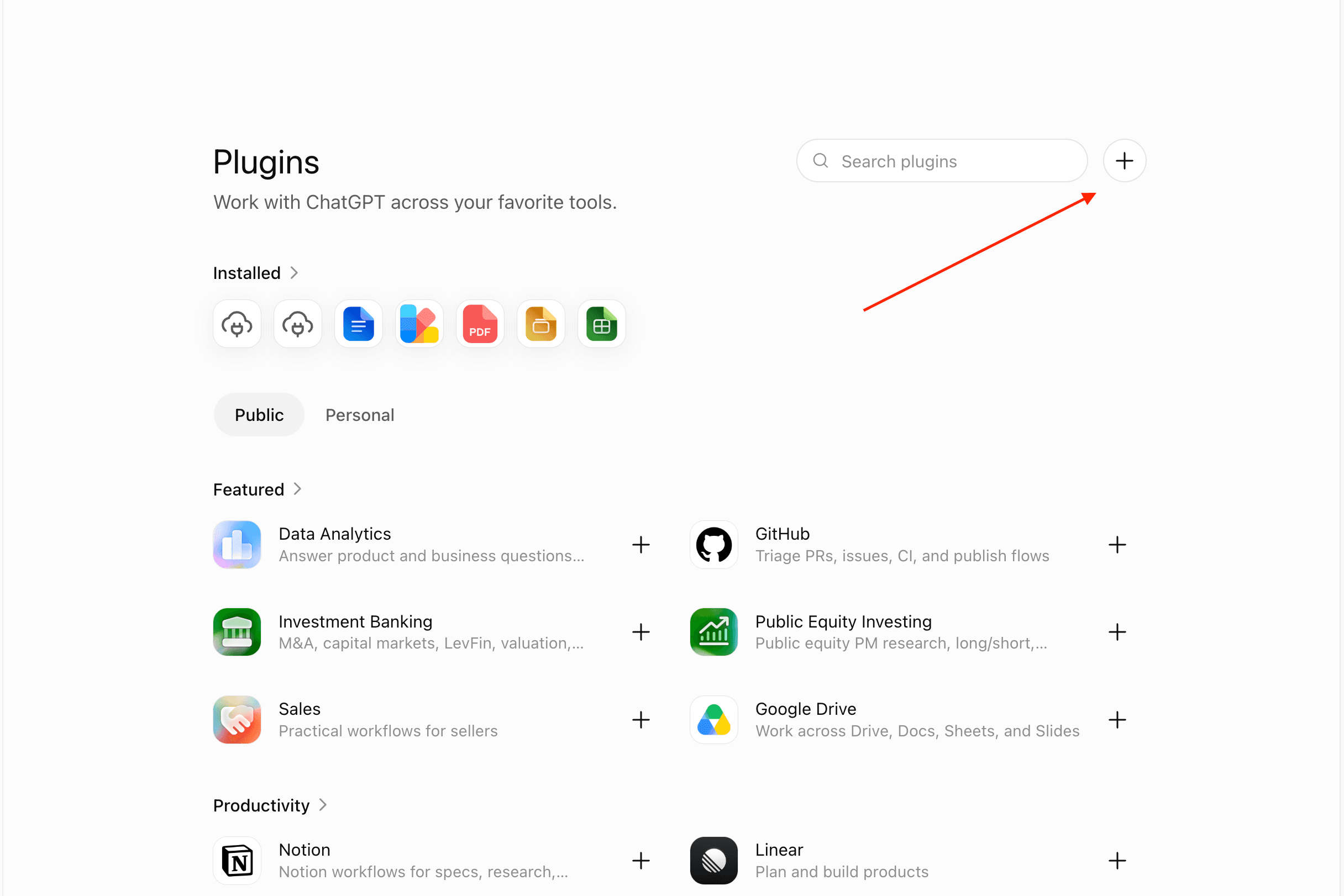
chatgpt.com/plugins → +, top right. Missing? Turn on Developer mode: Settings → Apps & Connectors → Advanced. Free tier works.
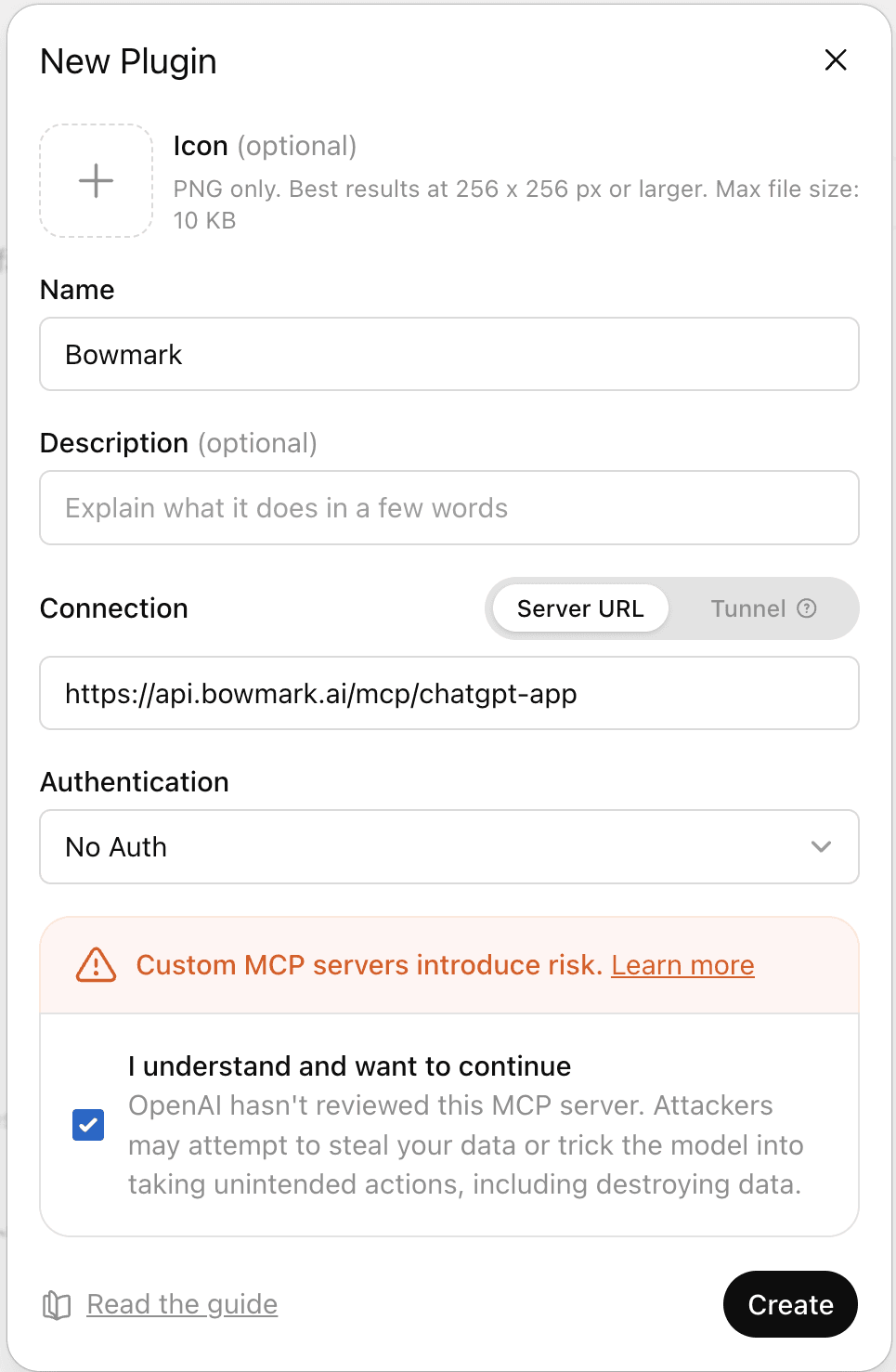
Name Bowmark, Server URL https://api.bowmark.ai/mcp/chatgpt-app, OAuth, tick
the risk box, Create.
Connect, then sign in to Bowmark when ChatGPT sends you there.
Type @ in the composer and pick Bowmark.

You must type @Bowmark every turn
A custom connector is never invoked on a bare prompt, on any plan. Without the @
the model cannot see Bowmark at all and will browse or answer from memory. Intended
OpenAI behaviour — only App Directory apps surface on their own.
Your own code
Writing the program yourself? Take the library, not an MCP.
npm i @bowmark/webimport { bowmark } from "@bowmark/web"; // reads BOWMARK_API_KEY
const { tracks } = await bowmark.music.search("aphex twin", 3);pip install bowmark-web bowmark-web-stubsfrom bowmark_web import bowmark # reads BOWMARK_API_KEY
found = await bowmark.music.search("aphex twin", 3)`read.page` can only be called through `run()`
A few functions pick their rung per call, and neither the bowmark client nor
session() can serve one — they throw rung_undeclared. Use
run('return await bowmark.read.page("https://example.com")'). Error table on
Scripting.
Both MIT, zero runtime dependencies, same version. Sessions, errors and the no-install HTTP path: Scripting.
API keys
Shown once, at creation, and stored hashed. Send as Authorization: Bearer <key>,
or set BOWMARK_API_KEY for the stdio bridge and the libraries.
curl -s https://api.bowmark.ai/v1/library?query=flights \
  -H "Authorization: Bearer $BOWMARK_API_KEY"
A run that pauses for a login returns status: "needs_user" and a single-use handoff
URL. Usage is billed per call on the billing dashboard.
Check it works
Ask your agent to price something across several retailers. It should call
get_library, then run, and answer with a store, a price and a link in about ten
seconds. No tool call means it did not use Bowmark — in ChatGPT that is nearly always
the missing @. Quickstart has the prompt and real output.
Reading this with an agent?